|
|
|
|
|
|
Codic Engine.Net Service: What You Need Quick Downloads: Consumer Application Page--The ASPX Code to get you started. Consumer Application Code--The back-end, codebehind file (rename a .vb file) Available Methods--The methods available for you to call.
What Do I Need to Use the Service? Since the Codic Engine.Net operates on Microsoft's .Net Framework, your site's web server must also be capable of using the .Net Framework. You do not have to use it in your regular web site, but the server must be capable of doing this. At the minimum, this is what you need. It makes it easier if you have Visual Studio .Net installed on your computer, too. By the way--you do not need to know programming to use this Service. If you follow these directions to the letter, all you will be doing is configuring
Step-By-Step: What Do I Do First? Go ahead and download (right-click, save target as) the Consumer Application Page and Consumer Application Code. If you just click on the link, you may see a page that looks almost blank. Simply View:Source it and you can see the programming code. Whatever you name the pages, be certain the Application Page has .aspx as its file extension and the Application Code file is referenced on the page correctly (as CodeBehind) and has a .vb file extension. The CodicNet variable is a reference to our web service. Using this, you can access any method on our Available Methods page. This page is an example of what you barely need. Simply build the rest of your page around this code and you're good to go (you can even use FrontPage to modify the page--just make certain it does not delete the text box, command button, and label, nor the "<%@" stuff at the top of the page). The page must keep the script and everything in the form. Remember to save your page with an .aspx file extension and update the CodeBehind file location!
After You Have the Page: So now you have the page primed and ready. You need to tell your server how to access the Engine. The examples here are in Visual Studio .Net, but I will give other examples once I learn how to do it that way.
Go ahead and make a new project within Visual Studio .Net. Click "New Project"
and select "ASP.Net Web Application" from under "Visual Basic Projects". Name
your server as the location. For instance, we would use a folder within our
server, so the location might be "http://www.phoenixpo.com/CodicClient". You
will have to sign in to your web page from there.
After that, import the CodicServiceConsumer.aspx and CodicServerConsumer.aspx.vb files you edited. Feel free to rename it whatever you desire. To import it, right-click your project and go to Add:Existing Item... and find the aspx file (Visual Studio.Net will automatically import the CodeBehind file). You can also delete WebForm1.aspx if you like.
Rename both the solution and the VB Project "CodicClient". Also, right-click on the VB Project and go to "Properties". Make certain both the "Assembly Name" and "Root Namespace" are both set to "CodicClient". Click "OK" when finished.
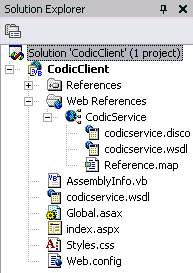
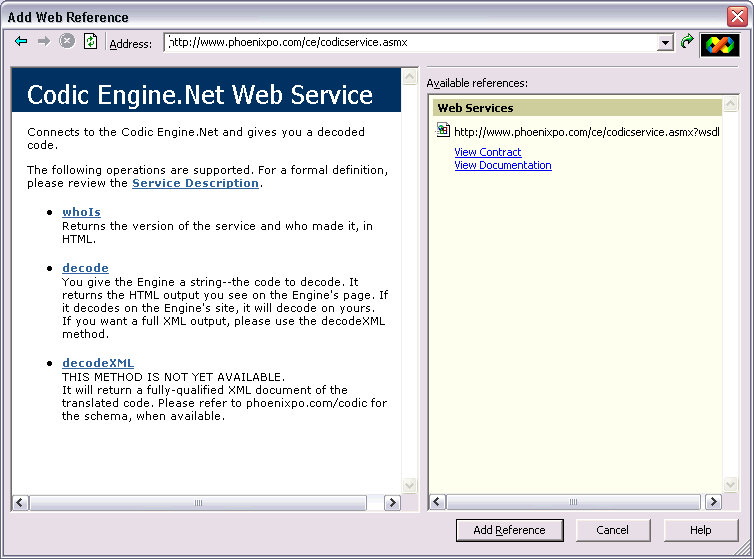
Next, we will add the web site reference to the Codic Engine.Net. Right-click your project once more and choose "Add Web Reference..." from the menu. Reference our thumbnail to the right if you need to see what the completed "Solution Explorer" will look like.
Updates Down the Road When we add more to the web service, it will appear on the Available Methods page. When we announce a new web service feature, we will post it here. Don't look to frequently, as we are mainly concerned about getting all aspects of the Engine up and running first. Web Services from here out will be a luxury.
Last updated: 2003/12/13 |
 |