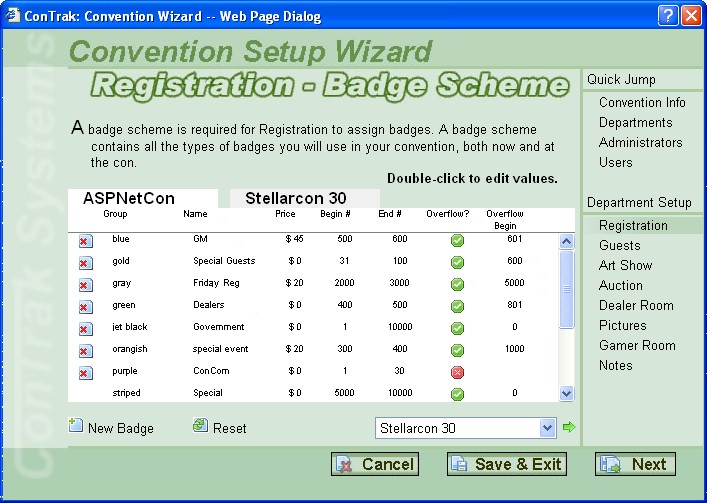
 For those of you interested, this is what the Registration Badge Scheme setup page will look like when seen through the Convention Wizard. Keep in mind it's just for the Convention Wizard; I have it in mind to have a separate edit page with more information than just that available to the Reg Admin.
I don't have much time tonight (it's 3AM) to explain, so here we go: When you go to the page, it just has the white panel. To import a badge from a previous convention, select the con from the drop-down list and it will appear in a tab (the light gray one in this example). The icons you see with x's on this screen will have +'s on the import screen (delete and add, respectively).
To edit a badge type's information on the white panel, double-click it and it will turn into an editable text box. Edit how you want and press "enter" or double-click the box and it turns back. Nothing is saved until you click the "save" button. You can even reset the page, too.
You can pretty much make sense of the rest of the page, so I'll stop right there and get some rest.
Next up is the Art Show Convention Wizard page. I also need to give a convention owner the ability to upload his/her con's logo.